Academic & Project Archive

A curated record of DeVry University and Grand Canyon University coursework, programming exercises, technical experiments, and larger projects that document the path from early hardware, Linux, Python, data, and C# work to operational software and playable applications.

This archive preserves the work worth keeping without placing every old assignment in the main Ghostline navigation. Selected projects remain public, while private course files should stay in a separate personal backup.

DeVry Programming Essentials Web Development Java C# / .NET Applied Projects

Programming Essentials with honors.

The DeVry program established the foundation for later Ghostline work through hands-on hardware, Linux administration, SQL and weather-data analysis, Python object-oriented programming, C# Windows Forms, testing, visualization, and desktop-interface development.

DeVry University

Programming Essentials

Undergraduate Certificate — With Honors

Completed coursework spanning hardware and software integration, Linux operating systems, Python application development, data analytics, and C# desktop software.

Awarded February 24, 2024

FOUNDATION

Skills carried into later projects

  • Hardware and software integration
  • Sensor input and Arduino control logic
  • Linux command-line administration
  • Users, groups, files, networking, and permissions
  • Python classes, inheritance, and unit tests
  • SQLite, SQL queries, CSV data, and charting
  • Tkinter and C# Windows Forms interfaces
  • Application design, validation, and local data storage
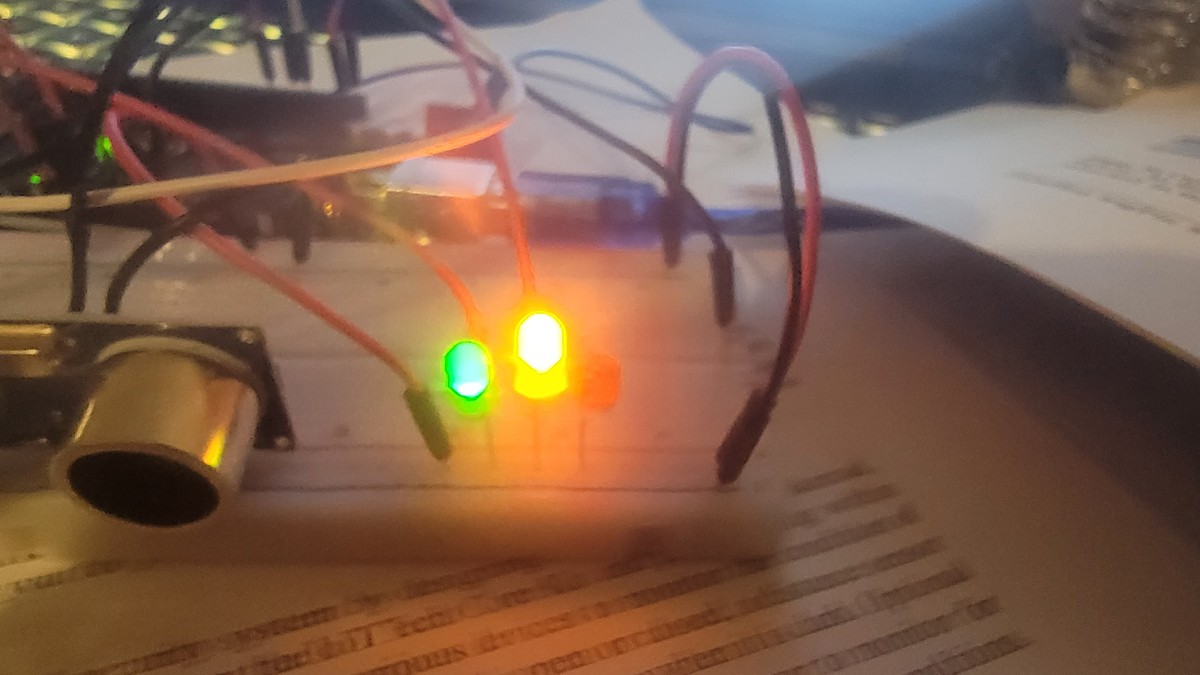
Arduino Mega smart-home circuit with illuminated status LEDs
CEIS101 Hardware / IoT Completed
ARDUINO

Home Automation System

A staged smart-home project built with an Arduino Mega 2560, breadboard components, sensors, LEDs, and serial-monitor feedback.

  • Door-open and door-closed status logic
  • Distance-sensor thresholds with green, yellow, and red LEDs
  • Photoresistor-controlled automated lighting
  • Sensor output, code evidence, and Excel data plotting
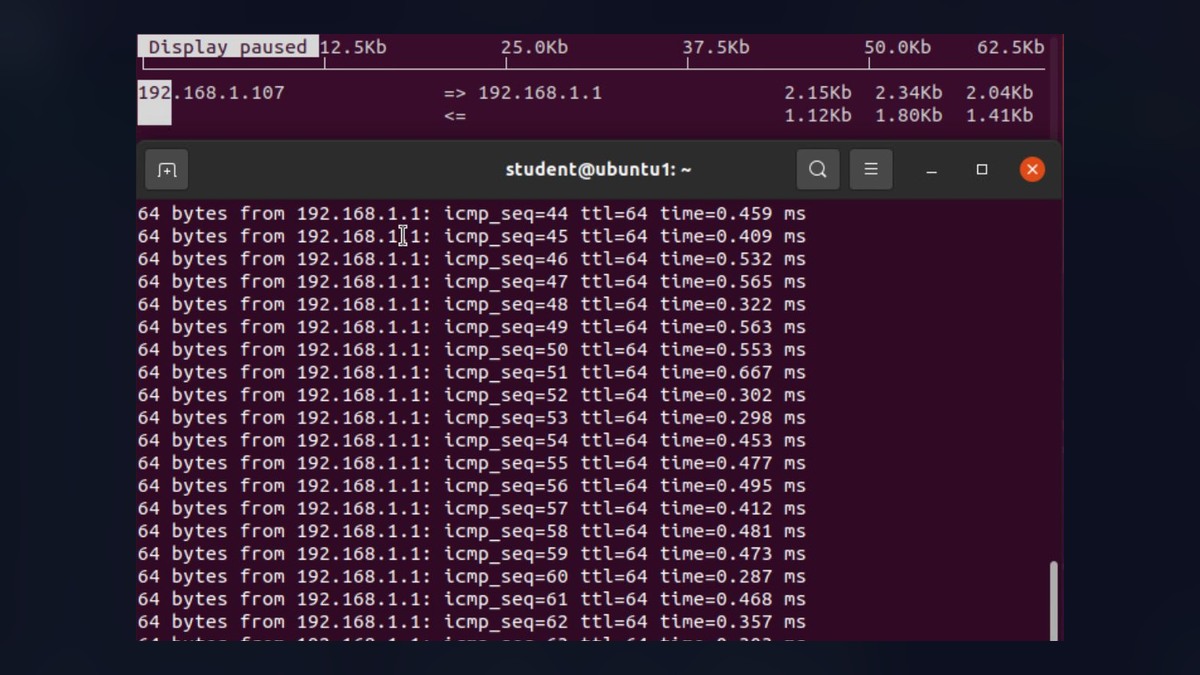
Ubuntu terminal showing Linux network testing commands
CEIS106 Linux Completed
OS

Linux Systems Administration

A Linux-focused final project documenting file-system work, shell scripts, account administration, networking, troubleshooting, and performance monitoring.

  • Files, directories, shell scripts, and permissions
  • PATH variables and command-line execution
  • User and group administration
  • IP configuration, DHCP, ping testing, security, and monitoring
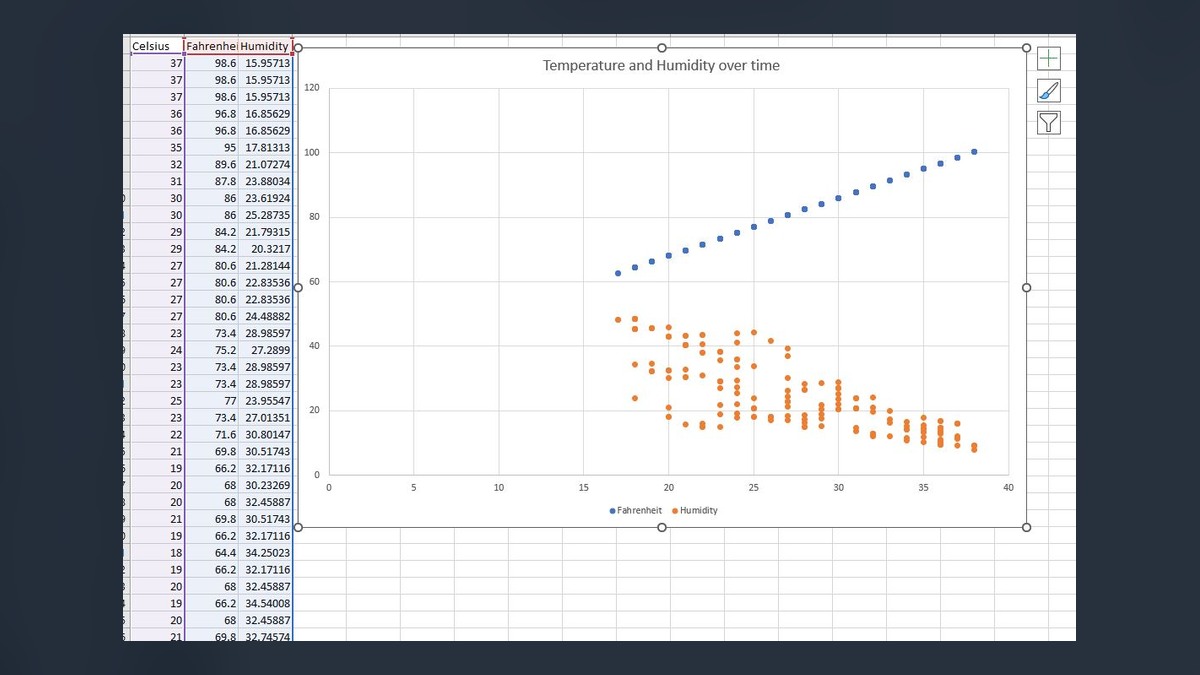
Temperature and humidity scatter plot produced from weather data
CEIS110 Python / SQL Completed
DATA

Weather Data Analytics Pipeline

A Python and SQLite workflow that gathered weather observations, stored them in a database, queried the results, exported cleaned data, and generated visual analysis.

  • Weather database creation and SQL queries
  • Temperature, humidity, minimum, maximum, and clear-day analysis
  • CSV export, data cleaning, and Excel visualization
  • Graphical models, correlation analysis, and short-term prediction
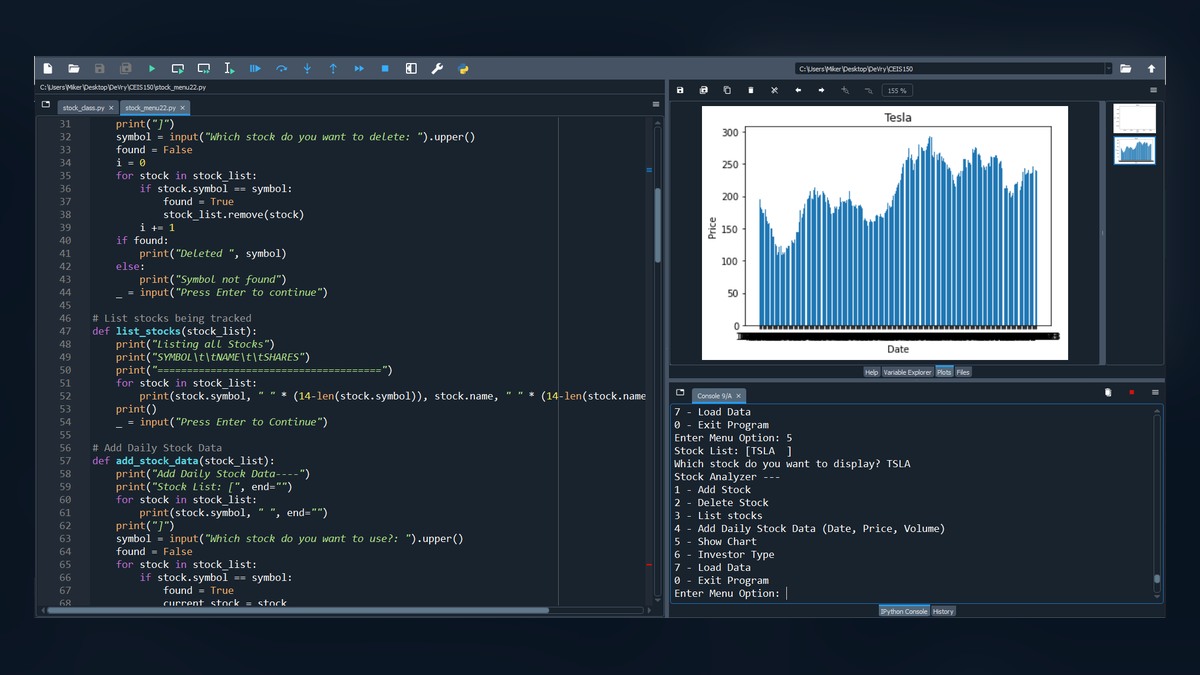
Python stock tracking code and a historical stock-price chart
CEIS150 Python OOP Completed
STOCKS

Python Stock Tracking Application

A multi-module stock application developed through object-oriented design, unit testing, inheritance, data import, reporting, charts, and a graphical desktop interface.

  • Class diagrams, classes, inheritance, and unit tests
  • Menu-driven add, list, delete, and history tools
  • Matplotlib price charts and Yahoo Finance CSV import
  • Tkinter tabs for stocks, history, and reports
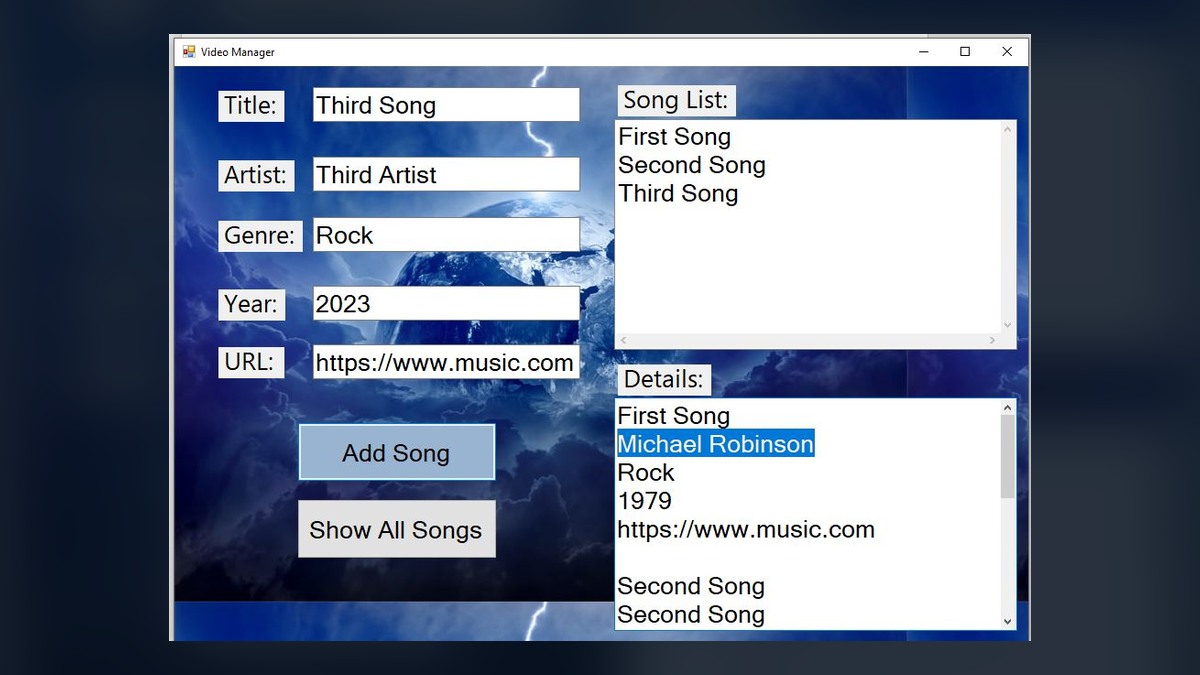
C sharp Windows Forms video manager with song fields and list controls
CEIS209 C# Windows Forms Part 1
MEDIA

Video Manager and Song Library

A Windows Forms application for storing and reviewing song information used in video projects, with embedded web playback support.

  • Title, artist, genre, year, and URL input
  • Validation, arrays, list controls, search, and detail display
  • StringBuilder output and event-driven controls
  • WebView2 navigation for selected media URLs
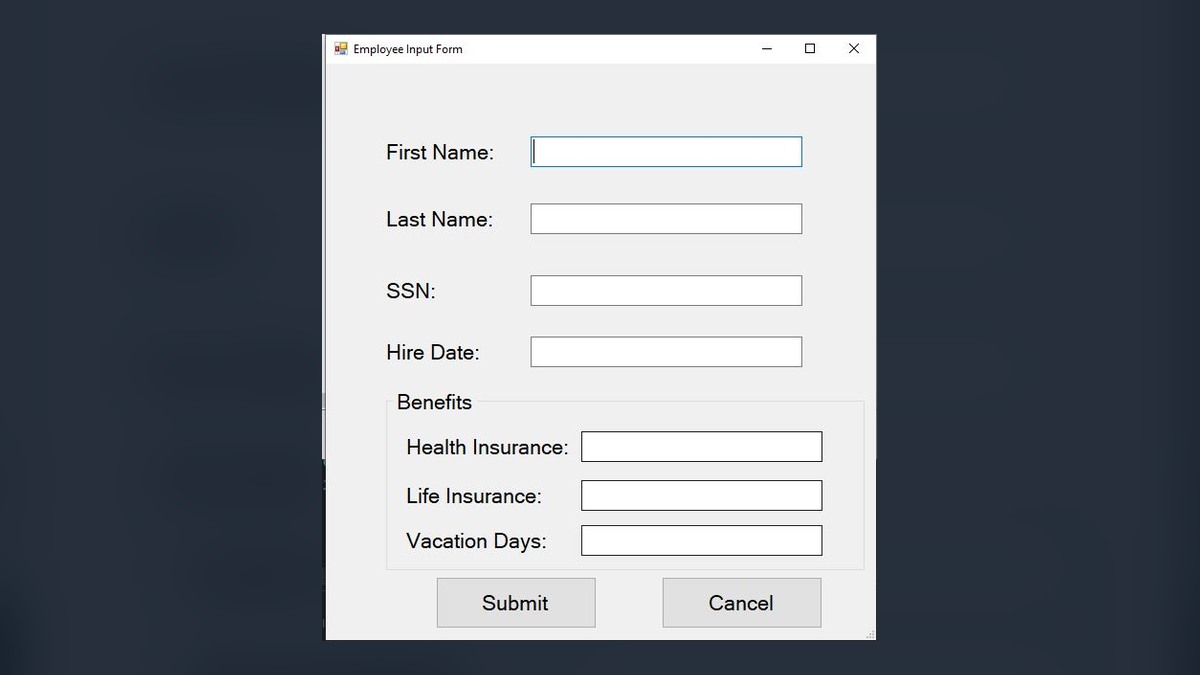
C sharp employee input form for a payroll system
CEIS209 C# OOP Part 2
PAYROLL

Employee Payroll System

A Windows Forms payroll application centered on an abstract employee model, hourly and salaried subclasses, benefits composition, file storage, and paycheck generation.

  • Abstract classes, inheritance, polymorphism, and composition
  • Hourly pay with overtime and salaried biweekly calculations
  • Add, update, remove, display, and local serialization workflows
  • Benefits records and generated paycheck amounts
EARLY PYTHON

Experiments worth preserving

  • Oregon Space Trail: functions, branching choices, and multiple endings
  • Choose Your Own Adventure: nested decisions and story outcomes
  • Tkinter Tip Calculator: classes, radio buttons, events, and currency formatting
  • Shopping List Manager: lists, functions, add/remove operations, and iteration
PRIVATE BACKUP

Evidence retained off the public site

  • Final source folders and cleaned source-code ZIP files
  • Final presentations, class diagrams, flowcharts, and screenshots
  • Credential records and instructor feedback
  • CEIS299 Python and Jupyter practice retained as supporting coursework

Coursework organized by learning stage.

Archive snapshot created in July 2026. Status labels preserve the learning sequence without requiring the page to serve as a current class schedule.

Completed 2024 — With Honors

DeVry University — Programming Essentials

Built a cross-discipline foundation through CEIS101 hardware and IoT, CEIS106 Linux systems administration, CEIS110 Python and SQL weather analytics, CEIS150 Python object-oriented development, and CEIS209 C# Windows Forms. The undergraduate certificate was awarded on February 24, 2024.

View DeVry Projects
Completed Foundation

CST-120 — Introduction to Web Development

Built a responsive multi-page portfolio while learning HTML, CSS, JavaScript, jQuery, Bootstrap, media, forms, navigation, accessibility, and website publishing.

View Course Matrix
Completed 2026

Java Programming I

Progressed from console logic and loops into file input, methods, classes, arrays, lists, inheritance, polymorphism, exceptions, unit testing, and multi-class application design.

2026 Coursework

CST-150 — Programming in C# I

Focused on Windows Forms, inventory models, event handlers, controls, file dialogs, lists, arrays, DataGridView, calculations, flowcharts, and interface design.

Next Stage

Java II and Continued Application Development

The next learning phase expands Java application architecture while Ghostline projects continue to provide applied practice outside individual assignments.
Console programs that built the programming foundation.

JAVA 01

Phoenix Street Program

Accepts a street direction, number, and type, then determines its position relative to Central Avenue and Washington Street and identifies the preceding street or avenue.

Decisions Strings Input Validation
JAVA 02

Number Guessing Game

Generates a number between 1 and 10,000 and uses higher-or-lower feedback while updating the remaining valid range after each guess.

Loops Random Numbers Ranges
JAVA 03

Contributions Tabulator

Reads contribution data from a file, stops after the required total, and reports the count, minimum, maximum, average, and total while handling insufficient or excessive input.

File I/O Methods Statistics
JAVA 04

Gift Card Game

A multi-class game using GiftCard, Barrel, Participant, and GameMaster objects with shuffling, dealing, automatic card swaps, elimination rules, scoring, inheritance concepts, and unit testing.

OOP Arrays & Lists Unit Testing

From object models to desktop interfaces.

M1

Food Inventory Model

Planned the application with an inventory-item model containing description, quantity, cost, category, and supplier properties, supported by a flowchart and interface wireframe.

Model Design Flowchart Wireframe
M2

Food Inventory Windows Form

Created a form that displays inventory items, quantities, costs, totals, and a grand total through a scrollable output area and button-driven event logic.

WinForms Events Calculations
UI

File and Data Activities

Practice activities covering OpenFileDialog, hidden labels, DataGridView, List<T>, two-dimensional arrays, switch logic, reusable models, and interface controls.

File Dialogs Collections DataGridView

Files worth preserving outside the public website

The public archive should show selected projects and demos. The complete academic record should live in a private backup arranged by course and week.

  • Final source-code folders
  • Submitted documents and PDFs
  • Flowcharts, UML, and wireframes
  • Input data and test files
  • Final submission ZIP files
  • Screenshots and execution results
  • Loom recordings and presentation notes
  • Instructor feedback and rubrics
  • README and setup instructions
  • One untouched original copy
PRIVATE

Keep sensitive material off the public site

Do not publish student identification numbers, grade screenshots, private instructor messages, answer keys, licensed course media, or complete copyrighted assignment instructions.

Public pages should focus on your code, design decisions, screenshots, lessons learned, and the final result—not private school records.

Preserve the work. Show the growth.

The archive keeps early work accessible without allowing school assignments to overcrowd the main company, software, or studio pages.